
Planning an AI Teaching Assistant and Moving from Ollama to vLLM to Handle 50 Concurrent Users
- Published on
Junyoung Yang
While working as a student researcher at Pusan National University's AI Convergence Education Center, I became responsible for developing Code Place, the university's coding practice platform.
Code Place is an online judge system similar to Baekjoon, but it is not limited to problem solving and judging. It is also widely used for midterms, finals, assignments in liberal arts and introductory major courses, and several on-campus programming contests. (about 800 real users)
Recently, we started planning an AI teaching assistant feature for Code Place. The idea was to let students receive AI-based hints when they get stuck while solving algorithm problems. The production server already had an RTX 5090 and a 4070 installed, so there was enough local GPU capacity. Because using an external API would involve cost handling, budgeting, and other operational complications, we decided to build and operate a local LLM server instead.
However, the current server setup was not simple. Stage, dev, and prod were all running in a single k3s environment, so deploying a local LLM was not straightforward. At first, I used Ollama because it was the fastest way to get something running. After testing it, though, the limitations of using Ollama in a production environment became clear, so I decided to move to vLLM.
This post summarizes the limitations I found in Ollama and why I switched to vLLM.
Requirements for Local LLM Serving
- Handle 50 concurrent users: In contest or class situations, I assumed that up to 50 students might request hints at the same time. The service needed to handle that level of concurrency reliably.
- Respond within 10 seconds: To avoid making students wait too long for hints, the target was to keep average response time under 10 seconds.
- Response quality: The model still had to produce hints that were actually useful to students. Maintaining reasonable answer quality was also important.
- Operational stability: The server had to run without issues such as OOM errors or crashes.
Test Environment
- CPU: INTEL(R) XEON(R) GOLD 6526Y @ 2.80GHz 16C 32T x 2
- RAM: 128GB
- GPU: Geforce RTX 5090 32GB
- OS: Ubuntu 22.04.5 LTS
- Model: Qwen2.5-Coder-7B-Instruct
I chose Qwen2.5-Coder-7B-Instruct because it offered strong performance for its parameter size, and I thought it fit the AI teaching assistant feature best.
I also considered Qwen3.5-9B at the time, but it had only been released recently when I was testing, so I decided it was not a suitable test target yet.
First Option: Ollama

Ollama Version: 0.17.7
The first option was Ollama, which was the fastest way to serve a local LLM. I chose it after a teammate recommended it, and the cute llama probably had some influence too.
Without any complicated setup, I could download a model and use it through an API right away. For the initial feature validation stage, it was very convenient. When I sent simple requests and checked the responses, it worked without any major issues.
The problem started when concurrent requests came in. Ollama worked well for single-request handling, but once concurrent requests piled up, response time increased sharply. In some cases, it even caused OOM errors in VRAM.
Ollama Concurrent Request Test Results
I changed OLLAMA_NUM_PARALLEL while testing and used Locust for load testing.
This option controls how many requests the model processes in parallel.
I tested only simple concurrent requests using the same prompt. The results were as follows.
OLLAMA_NUM_PARALLEL = 2
| Concurrent Users | GPU Usage | Completion Time | VRAM Usage | Summary |
|---|---|---|---|---|
| 2 | ~98% | ~7 sec | 21.3 GB | Stable |
| 5 | ~91% | ~40 sec | 21.4 GB | Increased latency, queueing occurred |
| 10 | ~88% | ~80 sec | 21.3 GB | Performance degradation and some 500 errors |
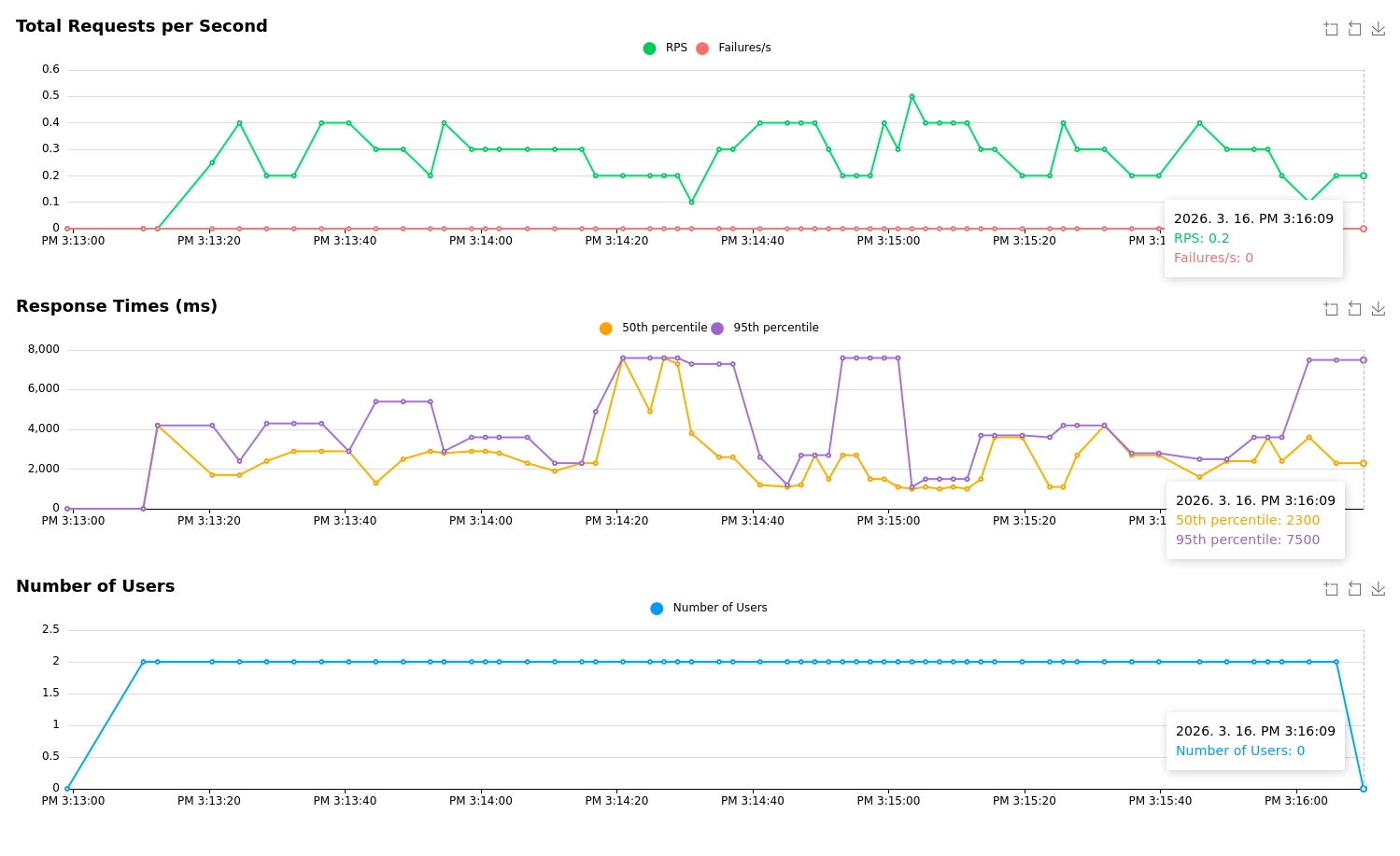
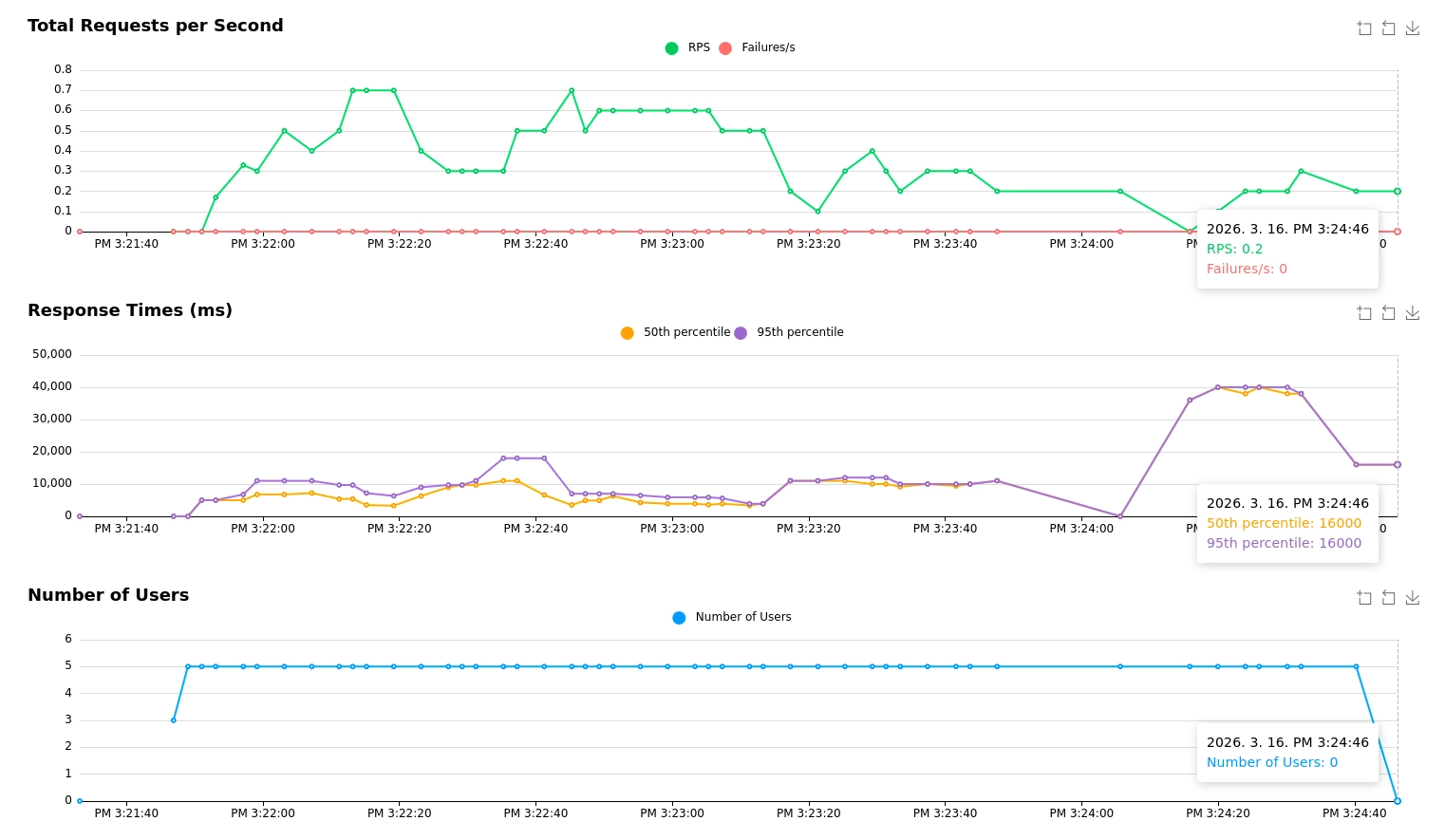
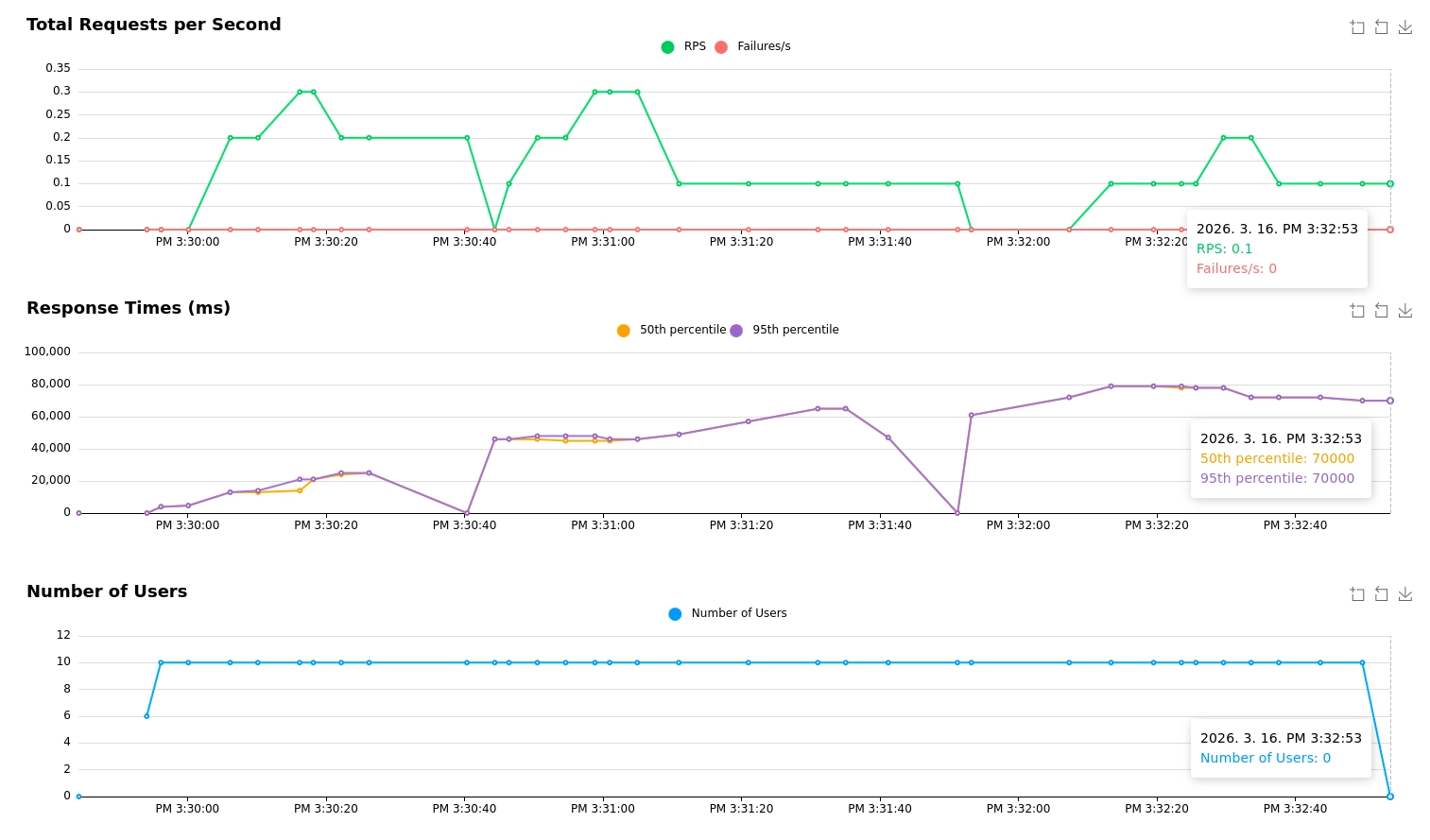
It handled two or three users stably, but as shown above, response time increased sharply starting at five users. Since the production environment needed to support up to 50 users, I concluded that Ollama would not be suitable.
I also tried setting OLLAMA_NUM_PARALLEL = 3, but it did not improve much. In many cases, it either caused OOM errors or failed to use the GPU efficiently. The lesson was that I should not be fooled by cuteness.
Second Option: vLLM

vLLM Version: 0.18.1
To be honest, I had already suspected that Ollama itself was not designed primarily for server-side production serving, so it would not be optimized for serving an LLM to many users concurrently. The test results supported that intuition, so I immediately started looking for alternatives.
There were several options, including vLLM and SGLang, but I saw many evaluations that vLLM was strong, and there were also quite a few real-world company use cases. I paid particular attention to vLLM because its optimizations, such as concurrent request handling, continuous batching, KV cache management, and prefix caching, seemed helpful for meeting the requirements.
I did not think Triton was necessary in this case because I only needed to serve a single LLM model.
vLLM Concurrent Request Test Results
I also tested vLLM with Locust, using the same approach as the Ollama test.
I sent simple concurrent requests with prompts of a similar length to the Ollama test. To measure the prefix cache hit rate more accurately, I made part of the prompt overlap while keeping the detailed content different.
The command options used during testing were as follows. I adjusted them while referring to the vLLM documentation.
vllm serve Qwen/Qwen2.5-Coder-7B-Instruct \
  --port 9090 \
  --dtype auto \
  --gpu-memory-utilization 0.9 \
  --max-model-len 4096 \
  --kv-cache-dtype fp8 \
  --enable-prefix-caching \
  --max-num-seqs 40
| Item | 12-User Test | 30-User Test | 50-User Test |
|---|---|---|---|
| Average response finish time | Stayed under 3 sec (2.7 sec) | 2.891 sec | 3.400 sec |
| Success/failure | 0 failures | 1,817 successes / 0 failures | 2,724 successes / 0 failures |
| Prefix cache hit rate | About 95.45% | About 95.56% | About 95.5% |
| VRAM usage | About 31.1GB | About 31.1GB | About 31.1GB |
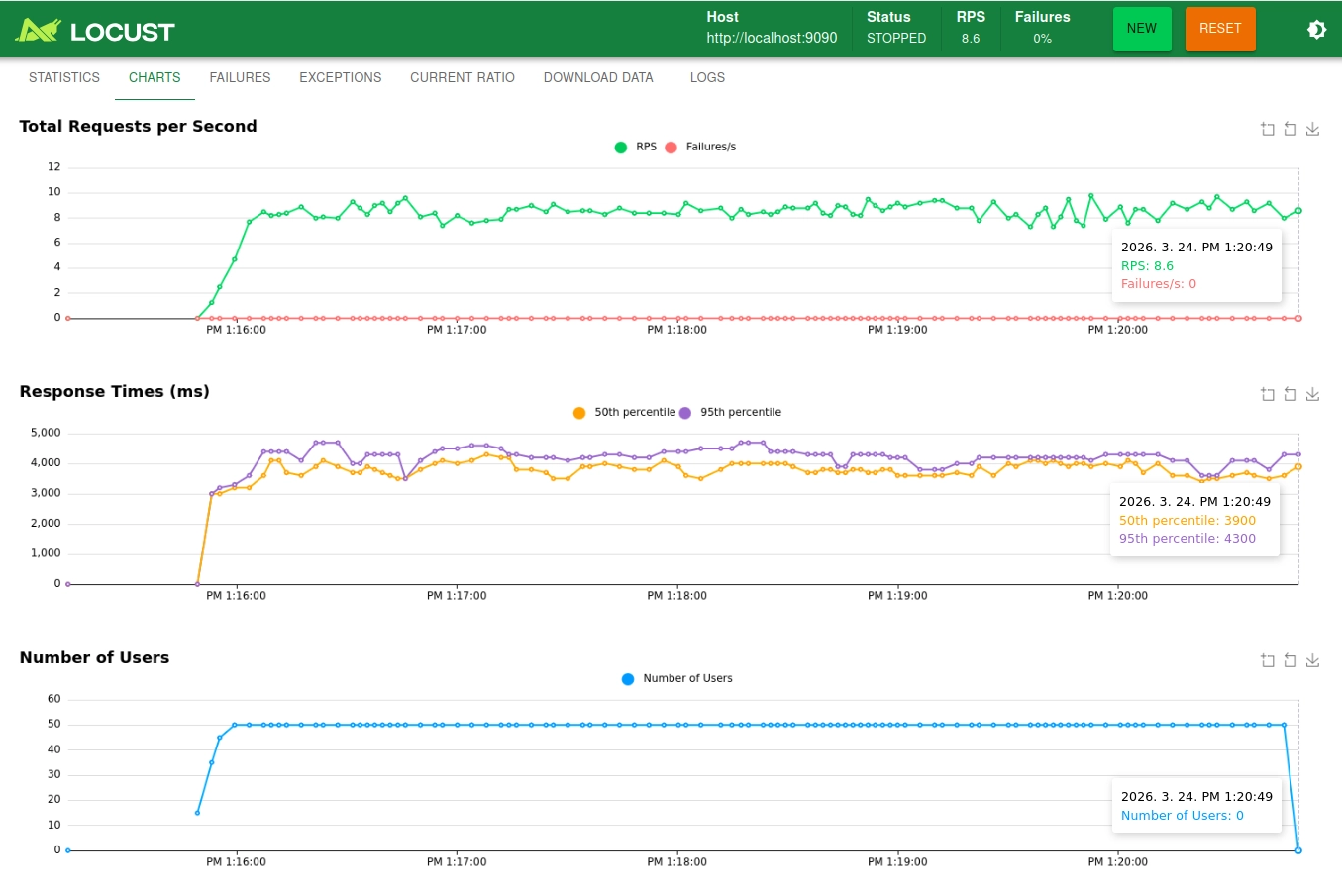
The cache hit rate and response time can vary depending on prompt length and content, but across the 12-user, 30-user, and 50-user tests, the average response time stayed within about 3 to 4 seconds. There was not a single failed request. This confirmed that vLLM could handle concurrent requests much more stably and efficiently than Ollama.
In other words, I concluded that serving through vLLM would satisfy all of the requirements I had defined at the beginning, so I decided to switch to vLLM.
Conclusion
I successfully built local LLM serving with vLLM on the test server, and it remained stable when connected to the Code Place backend for the AI teaching assistant feature. It also satisfied all of the requirements I had initially defined.
Through the comparison between Ollama and vLLM, I gained a deeper understanding of vLLM's caching and optimization techniques. At the same time, if I had compared Ollama's characteristics and other candidates more carefully during the design phase, I could probably have implemented the feature faster without the migration cost. This was a reminder that technology choices should be made with clear reasoning and recorded in an ADR.
Deploying vLLM in the server's Kubernetes(k3s) environment was also not easy. I wrote about that troubleshooting process in Running vLLM GPU Workloads on k3s.