
Recovering a Longhorn and CNPG Failure After WAL Growth
- Published on
Junyoung Yang
While operating Code Place, I ran into a situation where a PostgreSQL instance would not start normally. At first, it looked like a database problem. The CNPG status said that the instances were not active, and there was also a message saying that none of the instances had reported a system ID.
But when I checked Kubernetes events and Longhorn state together, it was hard to treat it as only a PostgreSQL problem. The starting point was closer to disk pressure caused by WAL growth, and the result appeared through both CNPG state and Longhorn volume issues.
At first, restarting the PostgreSQL Pod or touching the operator looked like the quickest option. But restarting before checking the cause could change only the symptoms, so I separated the checks into database, Kubernetes, Longhorn, and node state.
This post is a record of how I recovered a failure where WAL growth, Longhorn, and CNPG were tied together.
Problem
The first things that stood out were the CNPG status messages.
Detected low-disk space condition, avoid starting the instanceWaiting for the instances to become activeInstances are present, but none have reported a system ID- A state that looked like
Dangling PVCdepending on the situation
At first glance, these messages make it easy to think that the PostgreSQL instance itself is broken. I also first thought about PostgreSQL internals.
But I did not immediately restart the Pod or redeploy the operator. Without checking the cause, I could have changed only the symptoms.
Especially in this incident, the failure started after WAL growth created disk pressure on the server. So instead of asking only "Why is the database not starting?", I had to ask "Are the storage conditions still valid for the database to start normally?"
Operating environment
The environment was a multi-node k3s cluster. PostgreSQL was operated with CloudNativePG, and persistent storage was provided by Longhorn.
This combination works well when each part is healthy. But once a problem happens, there are many places to check. If the database does not start, checking only the database is not enough. Kubernetes, CNPG, PVCs, Longhorn volumes, and the actual device state on the node all need to be checked together.
In particular, maintaining a Longhorn replica setup requires enough physical disk space on each node. Even if a PVC or Longhorn volume is expanded, replicas may not attach normally if the actual node capacity does not follow.
Initial hypotheses
At first, I considered four broad possibilities.
- The PostgreSQL instance state itself was broken and could not start normally.
- CNPG was preventing the instance from starting because of WAL growth and disk pressure.
- CNPG could not start the instance because it did not see the PVC or volume state as normal.
- The real cause was on the Longhorn side, and the result appeared as a CNPG state problem.
Rather than deciding which hypothesis was right immediately, I first checked where the process was actually getting blocked.
Cause Check
The first thing I did was avoid grouping the whole failure as just a "database problem." Instead, I checked each part separately.
- CNPG: cluster status messages, primary/replica recognition, whether instances became active
- Kubernetes: Pod events, PVC state, volume attachment, mount failures
- Longhorn: replica state, volume expansion, share-manager state, disk scheduling availability
- Node/Linux: actual mount conflicts, device usage, and possible interference from system processes such as
multipathd - PostgreSQL: replication slots, WAL retention state, and whether replication-related cleanup was needed
After separating the checks this way, I could read the CNPG message as a possible result, not necessarily the root cause.
CNPG Message Check
For example, failing to report a system ID means that the PostgreSQL instance did not reach a normal startup state. But that does not automatically mean the PostgreSQL data itself is corrupted.
It could also mean that the storage needed for the data directory was not mounted correctly, so the instance could not finish starting. So instead of asking "Why is the database broken?", I started asking "Why did the database stop here?"
The low-disk condition message was similar. I had to check whether the disk was actually full, whether PVC expansion had a problem, or whether Longhorn could not provide the volume correctly.
Operator messages were useful clues. But I did not treat them as the root cause right away.
Clues from the storage side
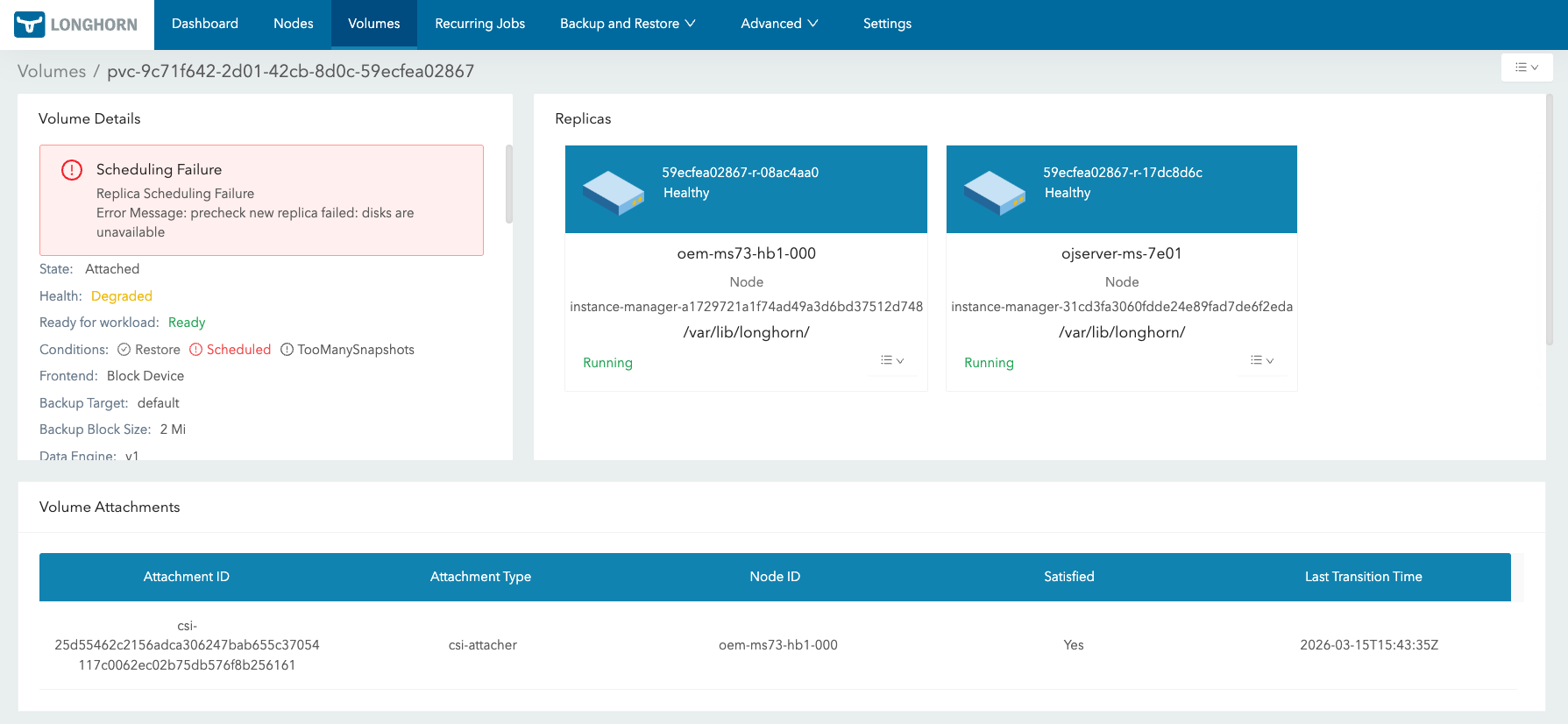
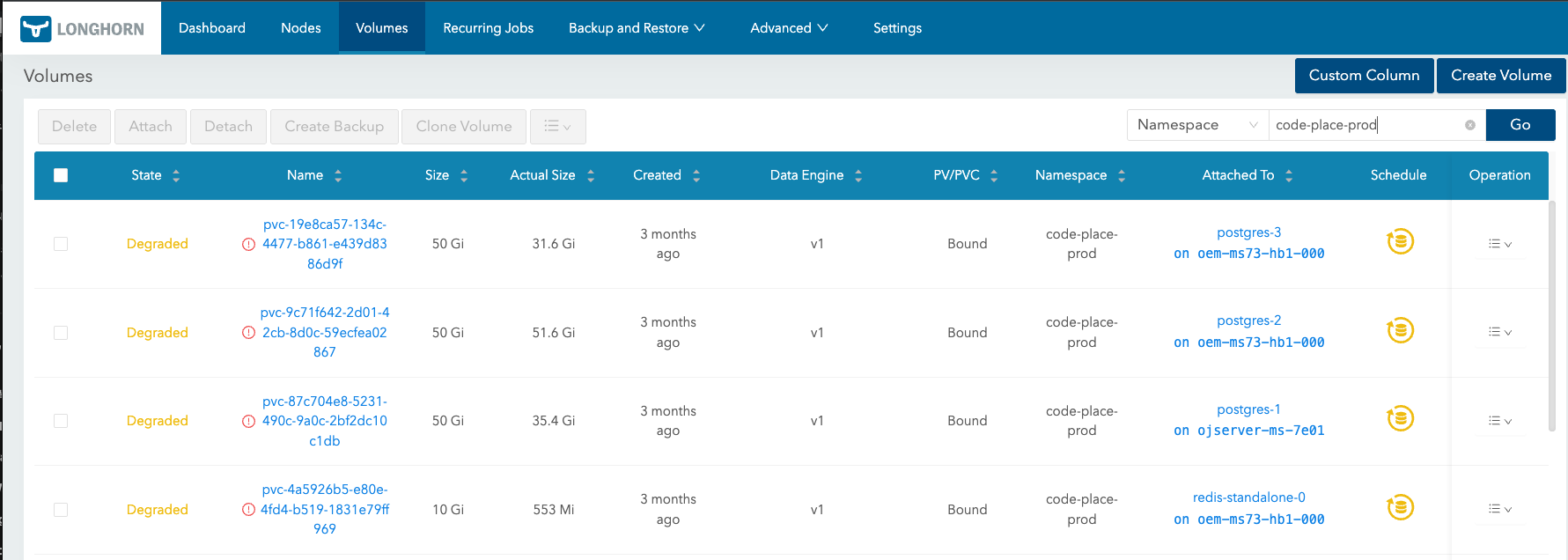
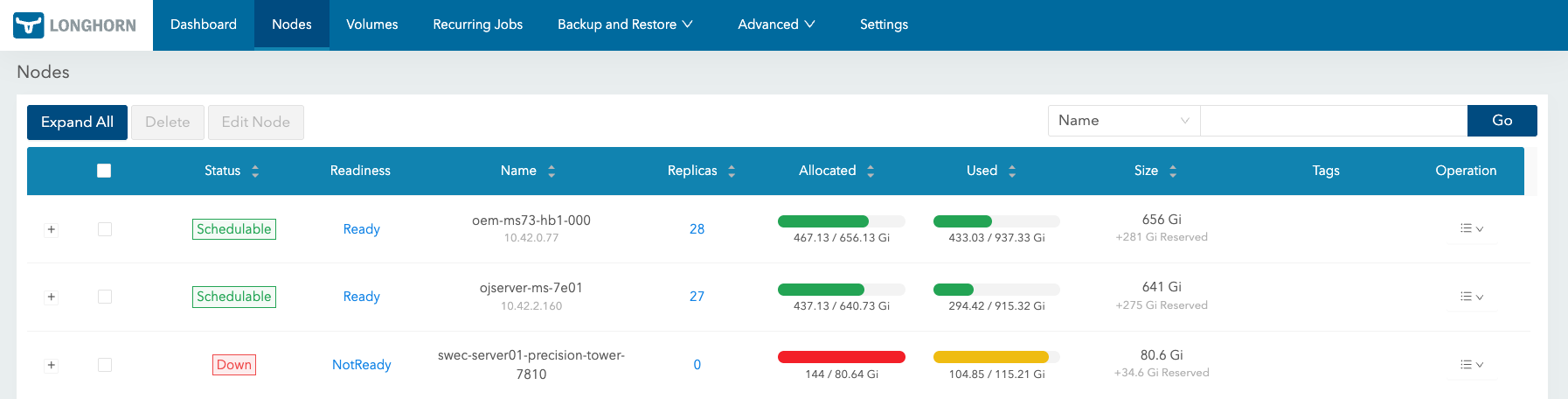
When I started checking the storage side, there were more clues below CNPG.
- WAL growth was quickly reducing the available disk space on the server.
- I tried to secure emergency capacity, but node 3 did not have enough free space.
- It became difficult to keep the existing three-replica Longhorn setup.
- The PVC itself was recovered, but CNPG did not immediately bring back the instance I expected.
- A mount error happened afterward, so I had to check the node-level device management state as well.
The confusing part here was that "the resource exists" and "the resource is actually usable" are different.
A PVC being Bound does not always mean the workload is mounting and using the volume without problems. A volume expansion finishing also does not always mean attach and mount have fully succeeded. A PVC existing also does not mean that CNPG will immediately adopt it again as a normal instance candidate.
From this point, I focused more on the storage side and the operator reconciliation flow than PostgreSQL internals when looking for why CNPG could not start the instance.
Actual recovery timeline


The starting point of this incident was disk pressure caused by WAL growth. WAL kept accumulating, available disk space decreased, and eventually the PostgreSQL instance could no longer stay in a normal state.
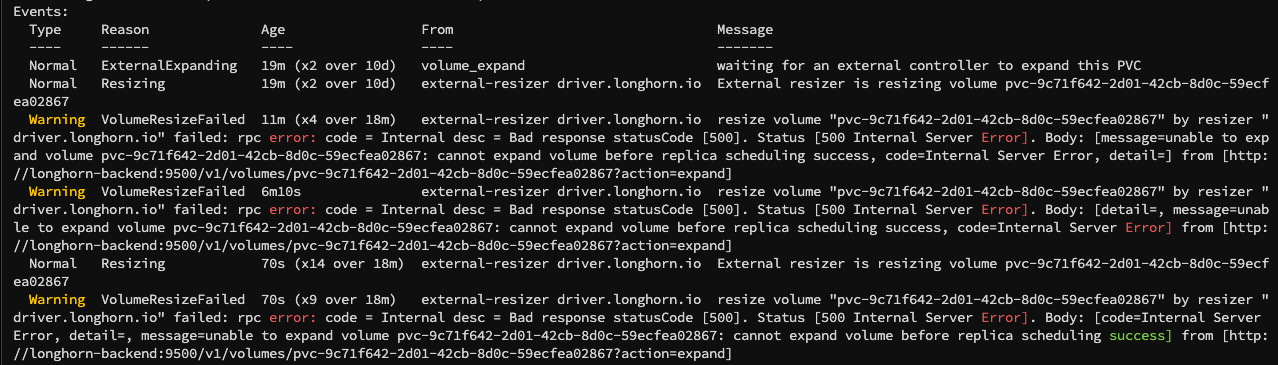
At first, I tried to secure disk capacity urgently. However, node 3 did not have enough free space at the time, so it was difficult to keep the Longhorn volume with three replicas. I first excluded node 3 from Longhorn and reduced the replica count to two. Instead of trying to restore all replicas immediately, I chose to make a setup that could start again first.
After that, I secured additional capacity, and the PVC itself could be recovered. But recovering the PVC did not mean that CNPG immediately brought the instance back normally. I expected the recovery to continue based on instance 2, but CNPG seemed not to treat a PVC that had once been seen as dangling as a normal instance candidate right away.
Restarting CNPG-related Pods did not make reconciliation move in the direction I expected. So I cleaned up the remaining Pods for instances 1 and 3. Only after that did CNPG start recovering based on instance 2.
Then another mount error appeared. This could not be solved by looking only at PostgreSQL or CNPG state. I had to check the actual node device and mount state. During this process, I found the possibility that multipathd was interfering with the block device Longhorn needed to use. I stopped and disabled multipathd on the node, then tried the mount again. After that, the mount issue was resolved, and recovery could continue based on instance 2.
There was also a reboot during the process to clean up node state. But the mount error seemed closer to the possible multipathd interference than to the reboot itself. So I did not summarize it as simply "it worked after reboot."
After instance 2 came back, I tried to recover instances 1 and 3 in order. Instance 1 recovered normally. Instance 3, however, could not attach again because of the Longhorn volume size increase made during the emergency response. To maintain three replicas, each node needed enough physical capacity for the expanded volume size.
The existing capacity on node 3 was not enough, so I mounted an unused disk on that node and added it as a Longhorn disk. After that, instance 3 could also be recovered.
Finally, I checked the database replication slots and WAL state. Since the failure started with WAL growth, unnecessary replication slots could cause WAL to be retained again and put pressure on the disk. So even after recovery, I checked whether replication slots and WAL cleanup were in a safe state.
CNPG RW and RO Endpoint Check
After recovery, I also checked which PostgreSQL service the application was actually using. A successful connection does not necessarily mean the application is connected to a writable primary.
CloudNativePG usually creates separate services by role.
postgres-rw: read-write endpoint for the primarypostgres-ro: read-only endpoint targeting replicaspostgres-r: read-oriented endpoint
If this distinction is missed, it is easy to misread a situation where SELECT works but INSERT fails as a database failure or an application transaction setting problem. An error such as cannot execute INSERT in a read-only transaction can make @Transactional(readOnly = true) look suspicious first, but the real cause may simply be that the application is connected to a read-only replica.
I could also check whether the current session was connected to a standby from inside PostgreSQL.
SELECT pg_is_in_recovery();
If the value is true, the current connection target is a standby. So after recovery, I checked not only whether the application could connect, but also whether both reads and writes worked through the intended -rw service.
Recovery Steps
My reasoning changed roughly in this order.
1. PostgreSQL state
I did not start by looking only at PostgreSQL internals. I checked operator messages and storage state together. The database was not starting, but the starting point was closer to WAL growth and disk pressure.
2. Replica count adjustment
With node 3 short on available space, restoring the three-replica setup immediately was difficult. So I first excluded node 3 from Longhorn and reduced the replica count to two, then focused on bringing back an instance that could actually recover.
3. PVC adoption
Recovering the PVC did not mean CNPG would immediately bring it back as a normal instance. Once it had been treated like a dangling PVC, a simple restart did not make reconciliation proceed in the desired direction.
4. Pod cleanup
While the Pods for instances 1 and 3 remained, CNPG did not recover instance 2 in the way I expected. After cleaning up the other Pods, CNPG started recovering based on instance 2.
5. Node-level mount check
While bringing back instance 2, another mount error happened. At that point, the issue was not only about CNPG or PostgreSQL. I had to check the actual node device and mount state.
I especially looked at the possibility that multipathd was touching the block device that Longhorn needed to manage, or making the device appear differently from what Longhorn expected. I stopped and disabled multipathd, then retried the mount. After that, instance 2 could be recovered.
This problem was worth writing down separately. Seeing a volume in Longhorn does not mean the volume is actually mountable on the node. I had to check share-manager state, ext4 messages, already mounted or mount point busy, and multipathd together. I covered this part in a separate Longhorn mount conflict post.
6. Disk capacity
Instance 1 recovered, but instance 3 did not have enough physical capacity after the Longhorn volume expansion. So I mounted an unused disk on node 3 and added it as a Longhorn disk. After that, instance 3 also recovered, and the three-replica setup could be restored.
7. Replication slots and WAL
Since the incident started with WAL growth, I checked replication slots and WAL state after recovery. If an unnecessary slot keeps WAL from being removed, the same kind of disk pressure can happen again.
8. Application CNPG Endpoint Check
At the end, I checked whether the application was pointing to the writable primary endpoint, not a read-only replica. Connection success alone was not enough. I had to confirm that both SELECT and INSERT worked through the intended path.
Check Order
After this incident, I started separating the state shown by the operator from the actual cause a bit more carefully.
CloudNativePG and Longhorn both automate many things. But during recovery, I had to separate "a resource exists" from "the operator can adopt that resource again as a normal candidate."
In a similar situation, I would check things in this order.
- Read the CNPG status messages.
- Check whether there is WAL growth or a low-disk condition.
- Check Kubernetes events and PVC state together.
- Check Longhorn replica, share-manager, and volume scheduling state.
- If needed, go down to the node and check the actual device and mount state.
- Check whether system processes such as
multipathdcan conflict with Longhorn device management. - After recovery, check replication slots and WAL cleanup state.
- Check whether the CNPG RW/RO service endpoint matches the application configuration.
- Then check whether PostgreSQL-level recovery is needed.
Takeaway
After this incident, when a database instance looks abnormal, I check storage and node state together instead of looking only at the database.
In this case, WAL growth, Longhorn replicas, CNPG reconciliation, PVC state, mount errors, multipathd, and replication slots looked like separate clues at first. But they were connected inside one recovery flow.
In short, simply starting the Pod again did not solve the whole problem. I had to make the conditions where the operator could see the system as normal again.